From Noticeboard to Service Desk: How Local Information Finds Its Readers
A local noticeboard and staffed service desk serve different needs. Learn what to post, what to explain in person, and how to keep details current.
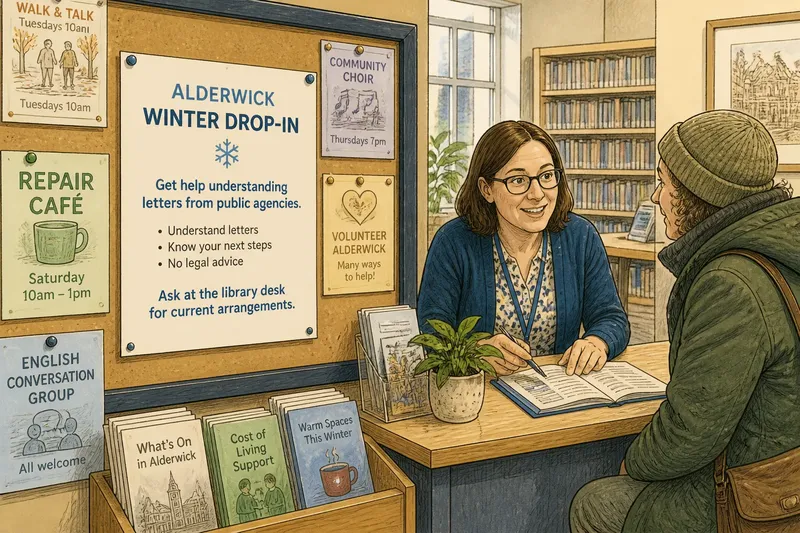
A local noticeboard catches attention; a staffed service desk helps someone decide what to do next. Put a clear notice near the library entrance and a visitor can spot a community service while passing by. At the desk, that visitor can ask whether the service fits their question and where to confirm its details.
Imagine a fictional town, Alderwick, where the library is sharing information about a winter drop-in. Its team has a busy entrance noticeboard and an information desk. Following one announcement from the board to a reader shows how the two formats can support each other.
One message, two formats
Alderwick’s service team describes the drop-in as a place to get help understanding letters from public agencies. Visitors can ask the library desk how to reach the service. The team must decide which details belong in a quick glance and which call for a conversation.
For the board, staff prepare a paper notice with a plain-language heading, a short description, and a direction to ask the desk for current arrangements. They place it where people can pause without blocking the entrance. The desk receives a fuller reference sheet with the service contact and a way to check whether a session is running.
The board puts the subject in view. The desk helps a visitor turn interest into a useful question. A flyer cannot tell what kind of help someone needs, but a staff member can listen and point them toward an appropriate contact. The distinction is like a label on a drawer beside a person who can help you choose what belongs inside.
What boards make visible
A physical board lets people browse without starting a conversation. Someone waiting for a family member might spot a repair café or pick up a leaflet about town services without explaining why. This works well for announcements people may not know to ask about.
Location shapes who sees a notice. A board by the library entrance reaches people arriving for books or events. A recreation center board may suit information about sports or youth activities. A notice at a community health center can reach visitors who would not think to look at the library.
Neighboring notices can spark useful discoveries, such as a language class beside a walking group announcement. But vague headings, crowded layouts, and outdated details make a board harder to scan. Clear labels, readable print, and a person responsible for removing old material help keep it useful.
Alderwick’s notice avoids inviting visitors to write names or personal circumstances on a public surface. Instead, it directs people to the staffed contact, where they can ask questions more discreetly.
What a desk can clarify
A staffed information point can respond to a visitor’s actual question. Someone might ask where a service meets, whether it addresses their concern, or whom to contact next. Staff can explain the difference between agencies, locate a leaflet, or refer the visitor to a specialist service.
A desk does not make every staff member an expert in every subject. Staff need a reliable source for service details and clear boundaries for what they can answer. For legal, medical, or financial advice, they should direct visitors to a qualified professional or relevant service rather than improvise.
A conversation can also help someone who finds notices difficult to scan because of unfamiliar wording, limited vision, language, or uncertainty about which organization handles an issue. Repeated questions can alert the town that its public message needs clarification.
In Alderwick, a visitor asks whether the drop-in can explain a letter from a landlord. The desk worker checks the service description and explains that the drop-in helps people understand correspondence but does not provide legal advice. The visitor receives the service contact and, if legal guidance is needed, a direction to an appropriate qualified source.
Keeping the handoff current
A notice can stay visible after its details change. Alderwick’s team therefore gives the service a named contact route, asks the desk to check availability with the provider, and assigns someone to revise or remove the paper notice when arrangements change.
Each part has a distinct job: the provider supplies current details, the board offers a concise prompt, and the desk answers questions or points to a more authoritative source. This arrangement gives visitors another route to current information if a flyer becomes outdated.
Say the fictional drop-in moves to another building. A staff member updates the desk reference, removes the old notice, and posts a replacement naming the new location and a route for confirming current arrangements. A person scanning the board can see that the location changed; someone with a follow-up question can ask the desk.
For a town setting up a similar service, ask what readers can learn at a glance, what needs explanation, and who will check each source. A noticeboard is like a tray by the door: it makes useful things easy to pick up, but it cannot tell you which one fits your situation. A desk can help with that choice.
Choosing the right format?
What belongs on a noticeboard?
Use the board for short public information people can understand without sharing personal details: a service name, plain description, location, and route for questions. If the announcement needs a long explanation or changes often, make the notice a pointer to a current source instead.
What should a staffed desk handle?
Use the desk for directions, clarification, and referral when the answer depends on a visitor’s circumstances. Staff should have an agreed source for service details and a clear way to refer questions to another organization or qualified professional.
How can a town keep notices current?
Identify an owner for each notice and give that person responsibility for checking whether its information still applies. The owner can remove or replace it, or direct readers to a source maintained by the service provider.
What if no one visits the desk?
Do not assume a full board reaches everyone who might need the service. Ask partner organizations where their visitors look for information, then place a clear notice there or provide a direct contact route suited to that setting.
Checking the information chain
Before posting, Alderwick’s team uses a short review to make the handoff clear:
- Check that the heading names the service; if it does, keep it, but if it is vague, rewrite it in plain language.
- Check that the description matches what the provider says the service offers; if it does, use it, but if it does not, confirm the wording with the provider before posting.
- Check that the notice gives a location or a clear way to find one; if it does, post it, but if it does not, add the missing direction.
- Check that the contact route works for a visitor’s next question; if it does, include it, but if it does not, ask the provider for a current contact.
- Check that the notice avoids requests for private information on the public board; if it does, display it, but if it asks for personal details, remove that request and offer a private contact instead.
- Check that a named person will review changes; if someone accepts that role, post the notice, but if no owner is identified, assign one before displaying it.
- Check that desk staff can verify current arrangements; if they have a reliable source, give them its details, but if they do not, tell visitors how to contact the provider directly.
For a fully worked fictional case, imagine Alderwick starts with a draft notice that names the drop-in but gives no location, contact route, or owner. The team checks the service description with its provider, adds the library desk as the question route, and names a staff member to check for changes. Staff then give the desk a reference sheet and display the revised notice. The resulting decision is clear: the board carries the short description and contact route, while the desk handles questions that need clarification.
The local noticeboard offers a chance encounter; the staffed desk offers a guided exchange. Keeping the message concise, the next contact clear, and an owner responsible for updates makes the handoff easier to follow. When the provider changes a detail, update both the board and the desk reference so visitors do not have to reconcile two different versions.